
1. Lub Vaj Huam Sib Luag Kov yog dab tsi?
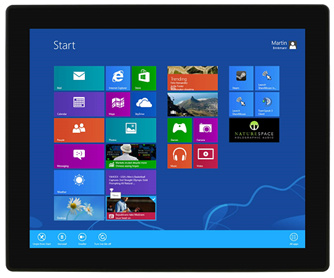
Lub vaj huam sib luag kov, tseem hu ua touchscreen, yog lub cuab yeej hluav taws xob nkag / tso zis uas tso cai rau cov neeg siv cuam tshuam nrog lub khoos phis tawj lossis cov khoom siv hluav taws xob los ntawm kev kov ncaj qha rau ntawm lub vijtsam zaub. Nws muaj peev xwm ntes thiab txhais cov lus taw qhia kov xws li tapping, swiping, pinching, thiab rub. Lcd Kov Screen tuaj yeem pom muaj nyob rau hauv ntau yam khoom siv xws li smartphones, ntsiav tshuaj, laptops, POS systems, kiosks, thiab cov zaub sib tham. Lawv muab cov neeg siv-phooj ywg thiab intuitive interface uas tshem tawm qhov xav tau ntawm lub cev khawm lossis keyboards.
2. Hom Vaj Huam Sib Luag (TP)
ib)Vaj Huam Sib Luag Resistive(RTP)
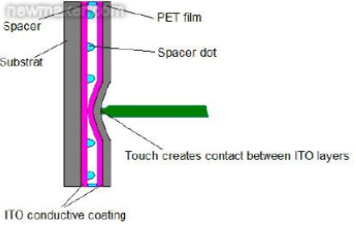
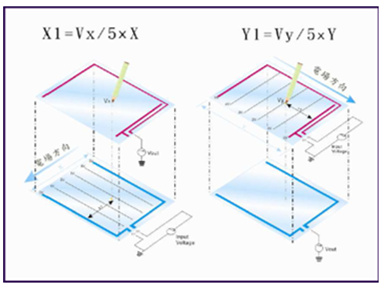
Lub vaj huam sib luag kov resistive yog ib hom thev naus laus zis kov uas muaj ob txheej ntawm cov khoom siv yooj ywm, feem ntau yog indium tin oxide (ITO) coated zaj duab xis, nrog qhov sib txawv me me ntawm lawv. Thaum nias rau ntawm lub vaj huam sib luag, ob txheej yuav sib cuag, tsim kev sib txuas hluav taws xob ntawm qhov chaw kov. Qhov kev hloov pauv ntawm hluav taws xob tam sim no raug ntes los ntawm lub cuab yeej tswj hwm, uas tuaj yeem txiav txim siab qhov chaw ntawm qhov kov ntawm lub vijtsam.
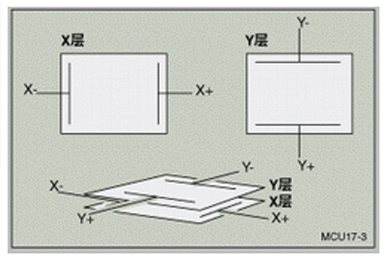
Ib txheej ntawm lub vaj huam sib luag kov resistive yog ua los ntawm cov khoom siv conductive, thaum lwm txheej yog resistive. Cov txheej conductive muaj cov hluav taws xob tas li ntws los ntawm nws, thaum cov txheej resistive ua haujlwm ua cov khoom faib hluav taws xob. Thaum ob txheej sib cuag, qhov tsis kam ntawm qhov chaw sib cuag hloov pauv, tso cai rau tus maub los xam X thiab Y coordinates ntawm qhov kov.
Cov vaj huam sib luag kov resistive muaj qee qhov zoo, xws li kev ruaj khov thiab lub peev xwm ua haujlwm nrog ob qho tib si ntiv tes thiab stylus nkag. Txawm li cas los xij, lawv kuj muaj qee qhov kev txwv, suav nrog qhov tseeb tsawg dua piv rau lwm lub vaj huam sib luag kov.
ib)Capacitive Kov Vaj Huam Sib Luag (CTP)
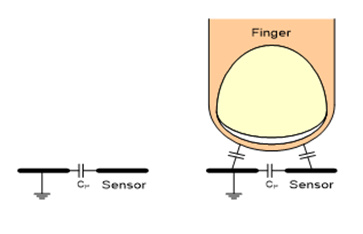
Lub vaj huam sib luag kov capacitive yog lwm hom thev naus laus zis kov uas siv cov khoom hluav taws xob ntawm tib neeg lub cev los ntes kev kov. Tsis zoo li cov vaj huam sib luag kov resistive, uas vam khom kev siab, cov vaj huam sib luag kov capacitive ua haujlwm los ntawm kev hnov cov kev hloov pauv hauv lub zog hluav taws xob thaum ib yam khoom conductive, xws li tus ntiv tes, kov lub vijtsam.
Hauv Capacitive Touch Screen, muaj ib txheej ntawm cov khoom siv capacitive, feem ntau yog cov hlau lead pob tshab zoo li indium tin oxide (ITO), uas tsim ib lub electrode grid. Thaum ib tug ntiv tes kov lub vaj huam sib luag, nws tsim ib qho kev sib txuas capacitive nrog lub electrode grid, ua rau muaj hluav taws xob me me ntws thiab cuam tshuam lub teb electrostatic.
Qhov kev cuam tshuam hauv lub teb hluav taws xob raug ntes los ntawm lub vijtsam kov, uas tom qab ntawd tuaj yeem txhais cov kev hloov pauv los txiav txim siab qhov chaw thiab kev txav mus los ntawm kev kov. Qhov no ua rau lub vijtsam kov paub txog kev kov ntau zaus, xws li nias-kom-zoom lossis swipe.
Cov ntxaij vab tshaus Capacitive muaj ntau qhov zoo, suav nrog qhov tseeb dua, qhov meej dua, thiab lub peev xwm los txhawb nqa ntau qhov kov. Lawv feem ntau siv rau hauv cov xov tooj ntse, ntsiav tshuaj, thiab lwm yam khoom siv kov. Txawm li cas los xij, lawv xav tau qhov nkag mus rau hauv lub cev, xws li tus ntiv tes, thiab tsis haum rau siv nrog hnab looj tes lossis cov khoom tsis siv hluav taws xob.
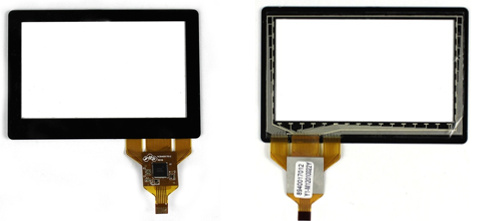
3. TFT + Capacitive Kov Vaj Huam Sib Luag
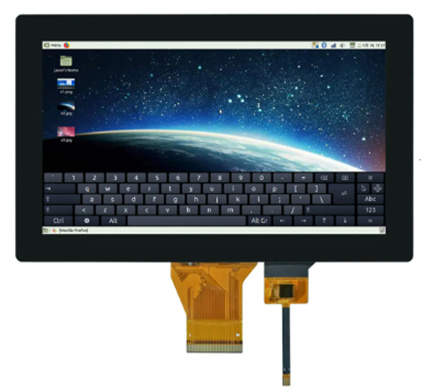
Cov Qauv—
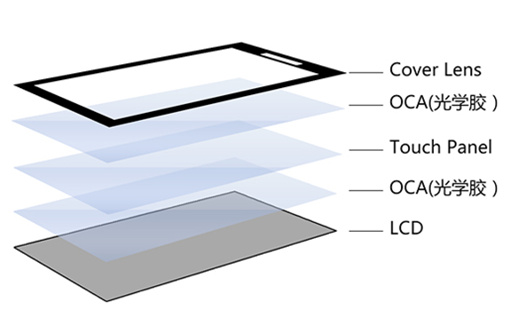
4. Qhov sib txawv tseem ceeb ntawm Resistive thiab Capacitive Touch Screen
Txoj Cai ntawm kev ua haujlwm:
- Kev kov Capacitive: Cov ntxaij vab tshaus kov Capacitive ua haujlwm raws li lub hauv paus ntsiab lus ntawm capacitance. Lawv muaj ib txheej ntawm cov khoom siv capacitive, feem ntau yog Indium Tin Oxide (ITO), uas khaws cov hluav taws xob. Thaum tus neeg siv kov lub vijtsam, cov hluav taws xob raug cuam tshuam, thiab qhov kov raug hnov los ntawm tus maub los.
- Kev kov tsis kam: Cov ntxaij vab tshaus kov tsis kam muaj ntau txheej, feem ntau yog ob txheej conductive sib cais los ntawm ib lub spacer nyias. Thaum tus neeg siv nias thiab ua rau txheej sab saud puas, ob txheej conductive yuav sib cuag ntawm qhov chaw kov, tsim ib lub voj voog. Kev kov raug ntes los ntawm kev ntsuas qhov hloov pauv ntawm hluav taws xob tam sim no ntawm qhov ntawd.
Qhov tseeb thiab qhov tseeb:
- Kev kov Capacitive: Cov ntxaij vab tshaus kov Capacitive feem ntau muab qhov tseeb thiab qhov tseeb dua vim tias lawv tuaj yeem ntes tau ntau qhov kov thiab paub qhov txawv ntawm ntau hom kev kov, xws li pinch-to-zoom lossis swipe.
- Kev kov tsis kam: Cov ntxaij vab tshaus kov tsis kam yuav tsis muab tib theem ntawm qhov tseeb thiab qhov tseeb li cov ntxaij vab tshaus kov capacitive. Lawv zoo dua rau kev ua haujlwm ib zaug xwb thiab yuav xav tau kev nias ntau dua los sau npe kov.
Kev kov rhiab heev:
- Capacitive kov: Capacitive kov screens yog rhiab heev thiab tuaj yeem teb rau txawm tias qhov kov me me lossis qhov ze ntawm ib yam khoom conductive, xws li tus ntiv tes lossis stylus.
- Kev kov tsis kam: Cov ntxaij vab tshaus kov tsis kam tsis tshua muaj kev rhiab heev thiab feem ntau xav tau kev kov kom zoo thiab ruaj khov dua kom ua haujlwm tau.
Kev ruaj khov:
- Capacitive kov: Cov ntxaij vab tshaus Capacitive feem ntau ruaj khov dua vim tias lawv tsis muaj ntau txheej uas tuaj yeem yooj yim puas tsuaj lossis khawb.
- Kev kov tsis kam: Cov ntxaij vab tshaus kov tsis kam feem ntau tsis ruaj khov vim tias txheej sab saud tuaj yeem yooj yim khawb lossis hnav tawm dhau sijhawm.
Kev Pom Tseeb:
- Capacitive kov: Capacitive kov cov ntxaij vab tshaus feem ntau pom tseeb dua vim tias lawv tsis xav tau cov khaubncaws sab nraud povtseg ntxiv, ua rau cov duab zoo dua thiab pom kev zoo dua.
- Kev kov tsis kam: Cov ntxaij vab tshaus kov tsis kam yuav muaj qib pob tshab me ntsis vim yog cov txheej ntxiv uas koom nrog hauv lawv txoj kev tsim kho.
Nws yog ib qho tseem ceeb uas yuav tsum nco ntsoov tias thaum ob hom kov screen muaj lawv tus kheej qhov zoo thiab qhov tsis zoo, cov ntxaij vab tshaus kov capacitive tau dhau los ua ntau dua nyob rau xyoo tas los no vim lawv qhov kev ua tau zoo tshaj plaws thiab kev hloov pauv tau yooj yim hauv ntau yam kev siv. Txawm li cas los xij, cov ntxaij vab tshaus kov resistive tseem pom siv rau hauv cov lag luam tshwj xeeb lossis cov xwm txheej uas lawv cov yam ntxwv zoo, xws li cov chaw sab nraum zoov uas feem ntau hnav hnab looj tes lossis cov ntawv thov uas xav tau kev nkag siab siab dua.
5. Daim Ntawv Thov Vaj Huam Sib Luag
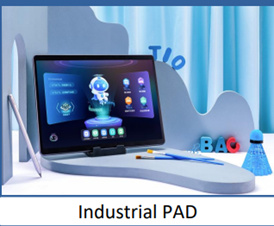
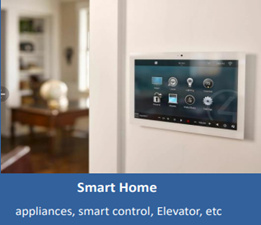
Cov ntawv thov vaj huam sib luag kov yog hais txog ntau yam kev lag luam thiab cov khoom siv uas cov vaj huam sib luag kov tau siv ua tus neeg siv interface. Cov vaj huam sib luag kov muab txoj hauv kev yooj yim thiab nkag siab rau cov neeg siv los cuam tshuam nrog cov khoom siv hluav taws xob los ntawm kev kov lub vijtsam ncaj qha.
Qee cov ntawv thov kov vaj huam sib luag feem ntau suav nrog:
- Cov Xov Tooj Ntse thiab Cov Ntsiav Tshuaj: Cov vaj huam sib luag kov tau dhau los ua ib qho tseem ceeb hauv cov xov tooj ntse thiab cov ntsiav tshuaj niaj hnub no, tso cai rau cov neeg siv los tshawb nrhiav cov ntawv qhia zaub mov, nkag mus rau cov ntawv thov, thiab ua ntau yam haujlwm siv cov lus taw qhia kov.
- Cov khoos phis tawj ntiag tug: Cov ntxaij vab tshaus kov tau siv ntau dua hauv cov desktops thiab laptops, ua rau cov neeg siv cuam tshuam nrog lawv lub khoos phis tawj los ntawm kev kov tes, xws li kov, swiping, thiab scrolling.
- Cov kiosks thiab cov chaw pabcuam tus kheej: Cov vaj huam sib luag kov tau siv rau hauv cov chaw pej xeem, xws li cov khw loj, tshav dav hlau, thiab tsev khaws puav pheej, los muab cov ntaub ntawv sib tham thiab cov kev pabcuam. Cov neeg siv tuaj yeem nkag mus rau daim ntawv qhia chaw, cov npe, cov txheej txheem muag daim pib, thiab lwm yam kev ua haujlwm los ntawm kev sib cuam tshuam kov.
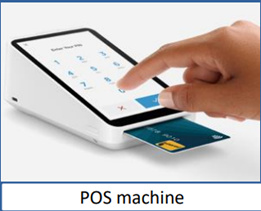
- Cov txheej txheem muag khoom (POS): Cov vaj huam sib luag kov feem ntau siv rau hauv cov chaw muag khoom rau cov tshuab sau nyiaj thiab cov txheej txheem them nyiaj. Lawv ua rau cov ntaub ntawv khoom, tus nqi, thiab cov ntsiab lus them nyiaj sai thiab yooj yim.
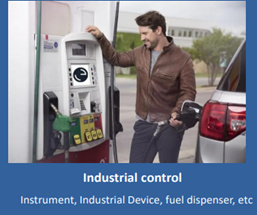
- Cov txheej txheem tswj kev lag luam: Cov vaj huam sib luag kov tau siv dav hauv kev lag luam los tswj thiab saib xyuas cov tshuab, khoom siv, thiab cov txheej txheem. Lawv muab lub interface yooj yim rau cov neeg teb xov tooj kom nkag mus rau cov lus txib, kho qhov chaw, thiab saib xyuas cov ntaub ntawv.
- Cov txheej txheem infotainment hauv tsheb: Cov vaj huam sib luag kov tau koom ua ke rau hauv lub dashboards ntawm lub tsheb los tswj cov txheej txheem kev lom zem, kev teeb tsa huab cua, kev taw qhia, thiab lwm yam ntxwv. Lawv muab kev sib txuas lus yooj yim thiab siv tau yooj yim rau cov neeg tsav tsheb thiab cov neeg caij tsheb.
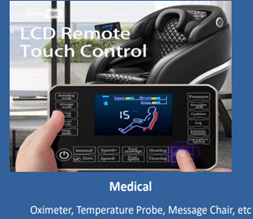
- Cov khoom siv kho mob: Cov vaj huam sib luag kov tau siv rau hauv cov khoom siv kho mob thiab cov khoom siv, xws li cov neeg mob saib xyuas, cov tshuab ultrasound, thiab cov cuab yeej kuaj mob. Lawv tso cai rau cov kws kho mob sib cuam tshuam nrog cov khoom siv sai thiab zoo.
Cov no tsuas yog ob peb yam piv txwv ntawm cov ntawv thov kov vaj huam sib luag, vim tias thev naus laus zis pheej hloov zuj zus thiab koom ua ke rau hauv ntau yam lag luam thiab cov khoom siv los txhim kho kev paub ntawm tus neeg siv thiab kev ua haujlwm.

Lub sijhawm tshaj tawm: Lub Yim Hli-08-2023


